7 Best AI Notetaker Apps for Meetings, Calls, and Lectures in 2026


“Can you create the minutes of this meeting and share it with everyone who was on the call? And also your action items for next week?”
Isn’t this what you hear from your team head every time you lead a team meeting? The difficulty isn’t emailing the MoM or having your action items ready. The actual challenge comes down to when you’ve not jotted down everything that was talked about in the meeting.
Maybe you were busy listening and half-heartedly wrote a few points in your notebook. Or maybe you joined late and missed some crucial stuff. Either way, you don’t have all the details to create the MoM, and now you’re asking teammates to fill you in, with no guarantee you’ll get it right.
AI notetaker apps are built for solving this, and a lot more, like pulling up what a client said about a contract renewal, or transcribing and sending follow-up emails related to your sales call without burning you out.
But I’m aware the internet’s already exhausted with 50+ such comparison articles. So this isn’t in a general “best AI notetaker” ranking, it’s about which one’s best for a specific use case.
How I Reviewed These Apps
I can't say I tried every single AI meeting note taker mentioned here on a practical level. That wasn't possible, especially with the time I had, and I couldn't get around to trying all these tools firsthand.
Plus some of them didn't let me use the features fully because of their free trial limits or no free plan at all.
Here's how I actually evaluated and reviewed these apps for the blog.
- I tried a few apps personally, but only on one-on-one calls, which means I can't fully vouch for the accuracy or how well they handle cross-talk in meetings with multiple people.
- For apps that I couldn’t use on less staged environments or features that were part of paid plans, I've mentioned based on users' review on G2, Reddit threads, or their own personal blogs.
- For a few tools that I didn't try at all, I went through the app’s own websites, docs, comparison articles, product hunt, and reddit forums to understand better
So my honest limitations here is that – not everything in this article comes from my own experience. Some of it is pulled from public reviews, other people’s experiences using these apps, and information straight from the vendors.
 Charu Mitra Dubey
Quick Picks
Since there’s no single best tool here, each one actually wins at something different depending on how you work and what you’re trying to get out of a meeting. Here’s a quick glance of the tools I’ve explained below in detail:
- Handle sales calls back-to-back? ➡ Fireflies is built for this, syncs data straight to Salesforce or HubSpot, and its AI Skills assist extract key data like deal timelines or discovery call scorecards without you digging into the transcript.
- Don’t want bot showing up on your client calls? ➡ Granola and Wispr Notetaker are for you. Especially if you don’t mind jotting down your own rough notes.
- Want free, unlimited recording without a workaround? ➡ Fathom’s the one, just know AI summaries are capped at 5 calls a month on the free tier, recordings and transcripts stay unlimited.
- Meetings involve more than one language in the room? ➡ Notta handles 58 languages for transcription and can run two languages in the same conversation without switching modes, genuinely useful if calls regularly mix English with something else.
- Recording a lecture or in-person class? ➡ Otter’s the one built for it, it screenshots slides automatically and adds them next to the part of the transcript, so what you get afterwards is a real study document, not just raw text.
Bot-Based vs. Bot-Free, Core Difference Explanation
Before getting into the actual apps, it's worth knowing one thing first: How do these tools capture the meeting or lecture audio and video in the first place? There's one key difference in how AI note takers work, and it's split into two modes, bot-based and bot-free (botless).
Bot-based apps behave like a “virtual attendee.” They join your video call as a visible participant, you’ll see it show up as its own tile, labeled something like ‘Nikita’s AI Notetaker’ or ‘Otter.ai Notetaker.’ It captures overall audio, and in some apps, video too, while the meeting is happening.
Bot-free tools work more like a local capture model. Instead of joining as a visible participant, they run directly on your device, without adding any bot to the call. They capture audio in one of two ways: either through your device’s speakers or microphone, picking up and mixing whatever it hears, or through a Chrome extension that reads your meeting captions or pulls audio straight from the browser tab.
Bot-based tools work best for back-to-back virtual teams, internal marketing calls, or anywhere you want a shareable call library. The upside is it can dial into a meeting you have to skip or arrive late to, capturing everything while you are away. The trade-off: it sometimes needs to be let in by the host. If a host rejects the bot from the waiting room, or the platform doesn't allow third-party bots, it simply can't work for you.
Bot-free tools are the better fit for client calls, in-person meetings, lectures, or anything sensitive where you don’t want data going to a third-party cloud. The tradeoff: you’re solely responsible for getting the other party’s consent to record, and making sure you’re not breaking any legal or ethical lines.
7 AI Notetakers Ranked by Use Case
Now that you know what each tool is best for, and the major difference in how AI notetaker apps transcribe and summarize meetings or lectures. Let’s get deeper into each tool's functionality, features, and pros and cons.
1. Fathom - Best Free Option for Zoom Users
Fathom is named to G2’s Best Software Awards Top 100 in 2026, and one of the best-rated AI notetakers on the platform sitting at a 5.0/5 rating from 5K+ reviews. It comes with the most generous free plan among any tool mentioned here – unlimited recordings and transcriptions, and advanced AI summaries for your first 5 calls each month ( after that only enhanced templates will be available).

It’s a great pick for small teams, freelancers, or consultants who live on Zoom calls specifically, as it offers bot-free audio and video capture through its desktop version (currently in beta and available for Mac). You can also highlight parts of a transcript both during live call and after it’s ended, and share that highlighted clip with anyone.
Key Features -
- Meeting capture is expanding beyond just audio, you can choose per meeting between bot-free transcription, bot-free video and audio capture, or full-video capture with the bot.
- Great for individuals or teams in sales and customer meetings, since it offers 15 summary templates tied to sales frameworks like the BANT, MEDDIC, and Sandler system.
- Integrates with CRM tools you’re probably using, Salesforce, Slack, HubSpot, once connected it automatically updates your CRM with key details.
- Supports 38 languages total for transcription.
Pros -
- Summarises the call, generates action items, and delivers the recording within 30 seconds of the meeting ending.
- Free plan lets you choose between visible bot, bot-free audio-video capture, or transcription only for Zoom calls
- Transcription accuracy is genuinely strong
- Clean, low-friction interface, minimal setup, and easy to use
- HIPAA, SOC2 Type II, and GDPR-complaint
Cons -
- Botless audio and video capture is limited to Zoom desktop users for now
- Google meet meetings are recording only through Chrome extension with bot that can feel intrusive
- Even though it supports 30 languages, it transcribes and provides summary in 7 native languages only.
Pricing: Free forever unlimited recording, instant call summaries, choice of bot-free and bot-capture beta) → Premium $16/mo/user → Team $15/mo/user → Business $25/user/mo (billed annually), all with 90-day guarantee.
 Charu Mitra Dubey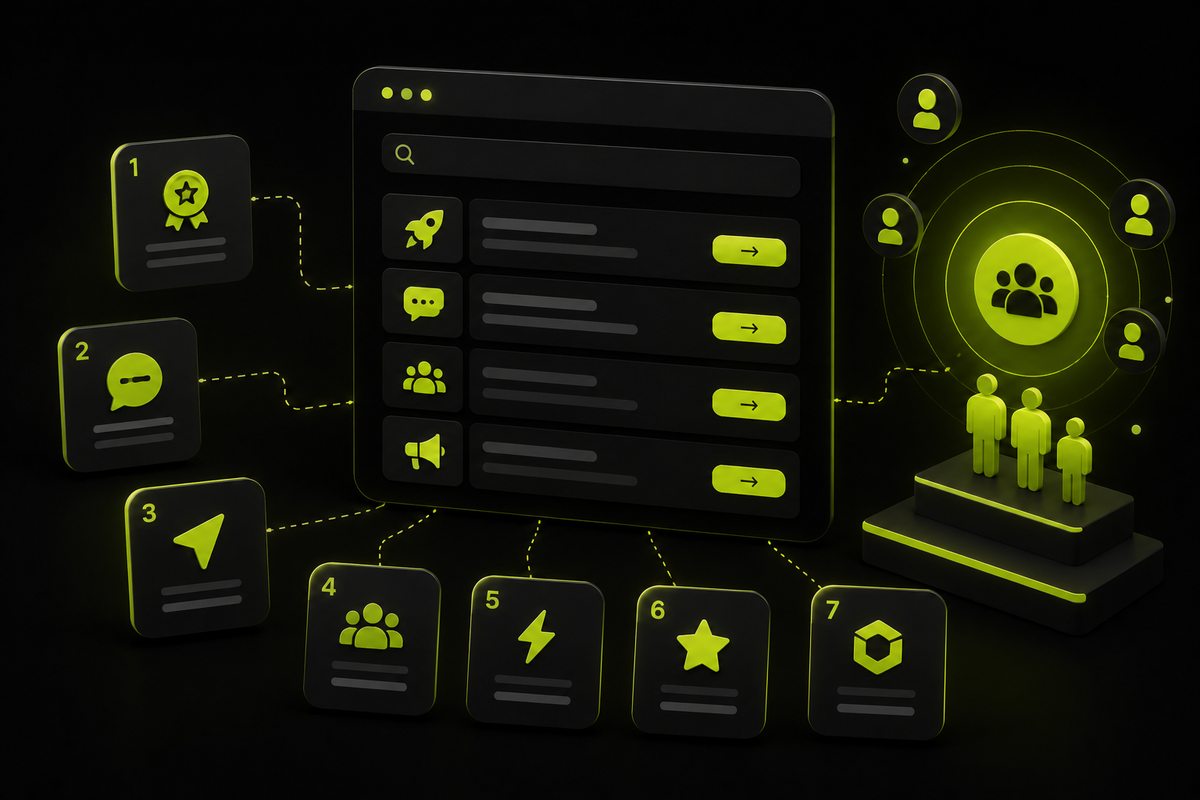
2. Granola - Best for no-bot personal use
Granola is what everyone’s talking about, it comes up a lot in comparison pieces and Reddit threads. It’s not just popular because of its bot-free way of recording and transcribing meetings, but also because of its hybrid notetaking model. It acts like a live notepad, you jot rough notes during the call, and let AI expand them into structured summaries, pulling in context from the full transcript as well.
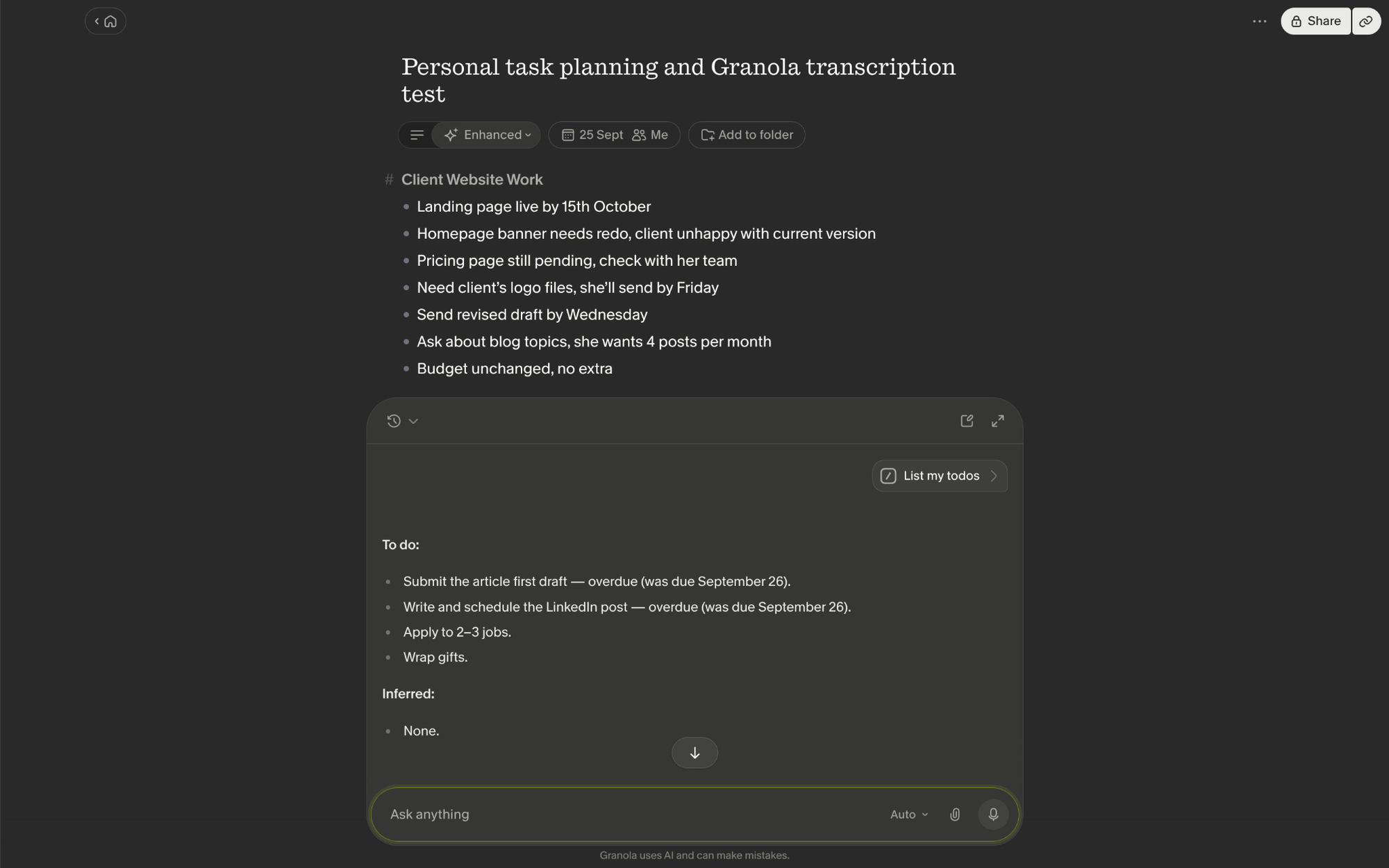
It solves a problem most others don't even acknowledge, a lot of users want to take their own notes, and hate the output of pure automation. And it's not limited to virtual meetings either, since it has iOS and Android apps, you can use it to transcribe in-person meetings, or lectures straight from your phone.
Key features -
- No-bot required, it uses your device’s audio to generate notes
- Supports 31 languages on desktop and 17 on mobile
- Comes with 20+ custom templates to build structured summaries for specific meeting types like board meetings, 1:1 calls, discovery sessions, and so on.
- Granola’s AI chat makes pulling information easier, with 25+ “recipes,” shortcuts for common prompts like drafting a follow-up email, catching up on what's being discussed, or generating weekly recap of accomplishments for your team.
- You can even create your own recipe to build custom summaries.
- Works with all meeting apps and connects to your team's tools through CRM, calendar, and project management integrations.
Pros -
- It offers bot-free recording of calls and meetings
- You can transcribe in-person meetings and phone calls
- Let’s you add rough notes manually, then let AI enhance them with full transcript
- Doesn't store audio from meetings, only keeps transcripts and notes, a real advantage for enterprises with security issues.
Cons -
- Free plan only gives you a 30-day window to note access, after that, you can't view them unless you move to a paid plan.
- It occasionally lacks in transcription accuracy and speaker diarization
- Doesn't record video, doesn’t offer audio playback, and provide shareable clips
Pricing: basic $0/user/mo (AI meeting notes, 30-day history) → Business $14/user/mo → $35/user/mo
3. Fireflies - Best for sales/CRM
You’re on your fifth sales call of the day and by the third call you’ve already lost track of who said what about the deal and budget. Fireflies help you organize your meetings and keep track of every meeting, who said what and why. It can automatically record, transcribe, and summarize your calls and meetings across all the major video platforms like, Zoom, Google Meet, Teams, and more.

Plus, with its “Meeting Prep” option it prepares you for your upcoming internal/external meetings based on your calendar. It briefs you on everything you need before you go into the meeting. Like, key discussion points from previous meetings with the same team or people. Plus, open action-items that were assigned but not completed, and relevant context sources to help you be prepared.
You can choose to invite the AI Notetaker bot to a live meeting or have it auto-join your calendar meetings. Or you can add a chrome extension of this tool and it automatically records your Google Meet calls.
Key Features –
- You can upload an audio or video recording file and let it transcribe and summarise for you.
- View live notes and live transcription while the meeting’s happening, and chat with it to if you have missed something while the meeting is on
- The notetaker provides AskFred AI assistant that lets you ask any insights or key details and it pulls answers from your meeting transcript history
- Fireflies supports 100+ languages for transcription
- Offers 200+ AI Skills (same idea as Claude Code skills) that pull specific insights out of a meeting on a command – sales budget, deal timeline, discovery call scorecard, or even drafting a follow-up proposal.
- You can use AI Voice Agents connected with the knowledge base to conduct conversations on your behalf.
Pros –
- The integration list is massive, it connects with 100 tools, so it’s a real win if your team already lives in HubSpot, Salesforce, Zapier, Asana, and more.
- It has a “Sentiment Analysis” feature that flags conversations in the meeting that were positive, negative, or neutral.
- It gives accurate speaker identification when transcribing the calls
- Works across live calls, in-person conversations, and uploaded files, not limited to one format.
Cons –
- The video recording option is not available in the free plan.
- The transcription is not as accurate as Fireflies claim it to be; it struggles with cross talks and accents. Sometimes it doesn’t register simple words/phrases.
- The auto-join is a trap if you’re not careful with the settings. If you turn on it for your whole calendar, then it’ll join every meeting, 1-1 included, without asking.
- It comes with minimum AI credits under paid subscriptions, so users always run out of AI credits and then they’ve to buy more AI credits, which double your monthly bill.
Pricing: Free (unlimited transcription, limited AI summaries, 400mins storage/team) → Pro $10/seat/mo → Business $19/seat/mo → Enterprise $39/seat/mo all billed annually
4. Notta - Best for multilingual teams
Notta is best known for multilingual teams. Nobody on your team, or even in a client call where English isn't their first language, has to worry about missing what's being said. Notta brings real-time monolingual translation during the meeting across 50+ languages, so you don't have to cut someone off just because you didn't catch it.
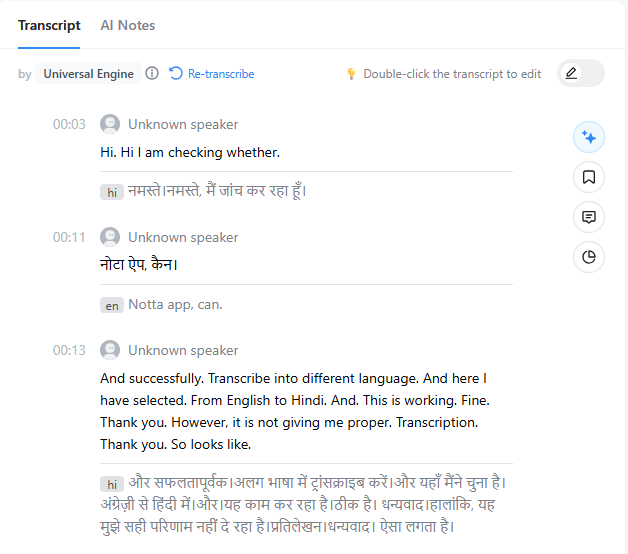
It also supports 23 languages for bilingual transcription and translation, letting you pick any two for a live or recorded call. That means you can speak English and get notes in Spanish, with both languages captured, no switching modes or reconfiguring mid-call. Notta also comes with its AI chat, Notta Brain, which turns meeting, interview, or lecture transcripts into summaries and helps generate deliverables like presentations, infographics, or data insights.
Key Features –
- It’s a versatile notetaker, transcribes uploaded audio/video files, records instant audio, joins live online meetings, and can even pull from a Youtube or other URL you add.
- Comes with both a bot-free desktop app and a bot-based chrome extension/web app.
- It works across all major video platforms, Zoom, Teams, Slack, Google Meet, and 10+ more.
- Offers 30+ summary templates for specific use cases summary data on, building custom templates available on the Pro plan.
- Has a built-in meeting scheduler, to book meetings directly inside your dashboard without needing any external tool like Calendly.
Pros -
- The app creates visual mind maps automatically from your meeting summary.
- Comes with 50+ languages for translation and transcription.
- Easy to edit transcripts, insert bookmarks, and add relevant images.
- Versatile enough to record online meetings, in-person lectures, phone calls, and screen-recording.
Cons -
- Sometimes misses words or sentences, or gives an inaccurate transcript output
- A few G2 reviews mention it struggles to identify the right speaker, or fails to recognize a new speaker altogether.
- The desktop version also has a bot-feature for video recording
- Notta AI Brain and other AI features run on a limited AI credit system for each plan; with add-ons only available on Pro and above.
Pricing: Free $0, no credit-card required (120 min/mo, 3-min conversation cap) → Pro $13.49/mo, billed monthly → $27.99/mo, billed monthly (per seat, pricing changes based on seats you include). Notta Brain add-on $12.99/mo, 8K AI credits/mo
 Charu Mitra Dubey
5. Wispr Flow - Best if you’re already using it for voice-dictation
If you hate typing and already use Wispr Flow for voice dictation, you don't need to look anywhere else to transcribe meetings, calls, and get a summary out of it. Wispr Flow gives you both: the dictation and the notetaker in one place. Compared to most of the other tools mentioned here, it doesn't bring much beyond transcribing and summarizing.
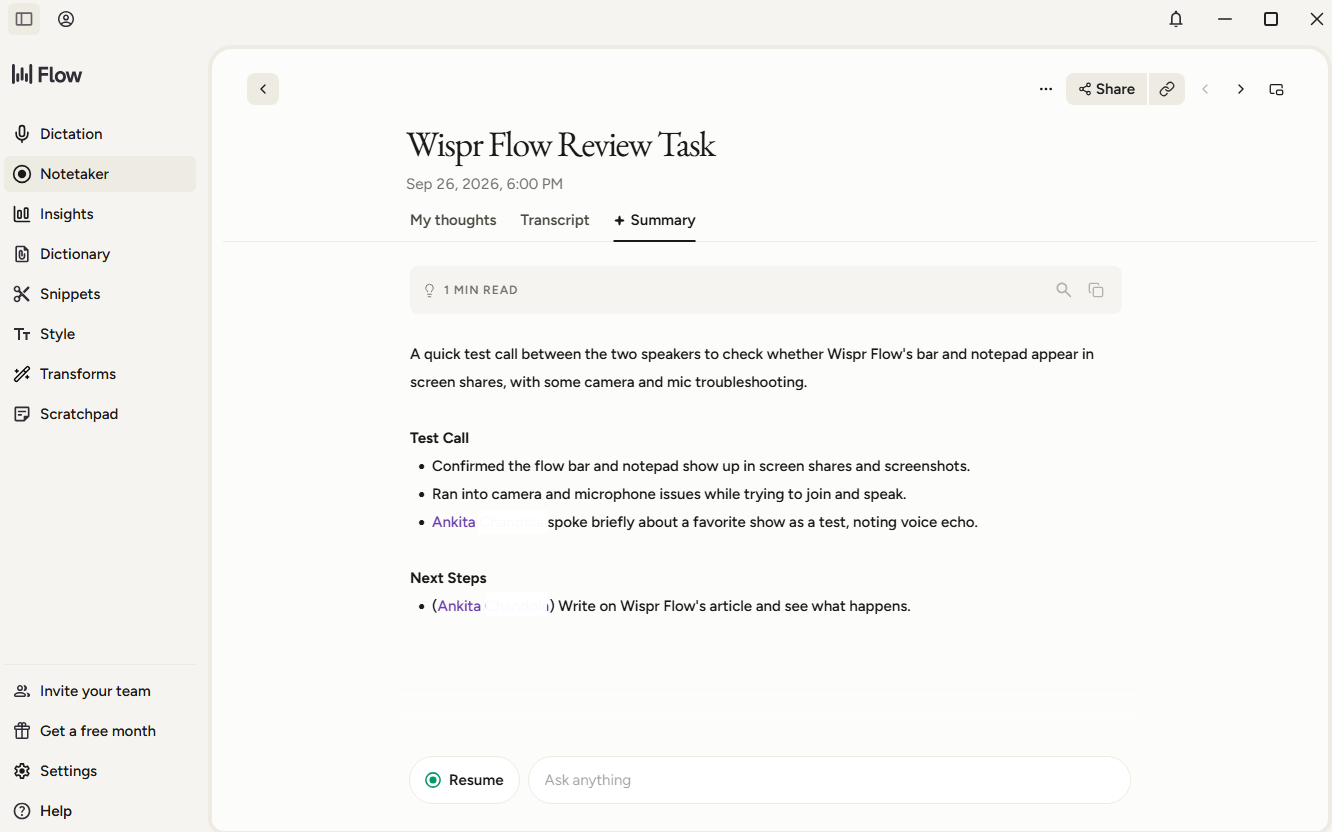
But if you have used its dictation before, you already know how accurate the text output tends to be. The Notetaker carries that same accuracy into speaker diarization and transcription, and it claims to handle industry jargon well too.
You can sync it with your calendar so it auto-detects upcoming calls, but it won't just join on its own, it always asks first if you want to start a note for that call.
Key Features -
- Display live transcription side-by-side during the meeting
- Lets you write your own notes under a “My thoughts” section in the notetaker.
- It has a “Dictionary” feature that learns unique words and names automatically, or manually, like industry jargon, personal names, corporate-specific lingo, so they transcribe correctly every time moving forward.
- Wispr Flow supports 21 languages for meeting transcription.
- You can integrate with Slack, and connect to other AI tools using its MCP connector.
Pros -
- Accurately detects and transcribes meetings across 21 languages.
- Let's you import past notes, transcripts, and summaries from Granola or Otter with one click.
- No need to ask someone to repeat themselves, the "What did I miss?" button in the notes chat catches you up instantly.
- You can rename a speaker if it identifies their name wrong.
- It provides controls over model training, storage, and retention of your data
Cons -
- During the live transcription it doesn’t label other speakers clearly, just tags them as “them.” Once the meeting ends, it corrects this with the actual speaker names.
- Doesn’t auto-generate a summary, you need to click the “generate summary” button yourself.
- Wispr Notetaker is only available for Mac and Windows right now, not for mobile.
Pricing: Free $0/mo (2000 words dictation per week and limited Notetaker access) → Pro $12/user/mo (billed annually), included unlimited dictations, longer Notetaker history → Growth $18/user/mo (billed annually) → Enterprise custom
6. Grain - Best for sales clips and testimonials
Grain is the best AI notetaker for mid-market sales teams, remote teams, or customer success teams. It keeps everyone organized and makes sure nothing slips past for anyone. The best part is its ability to clip any part of a meeting straight from the transcript, save, and share it with the team, so nobody has to sit through the whole recording.
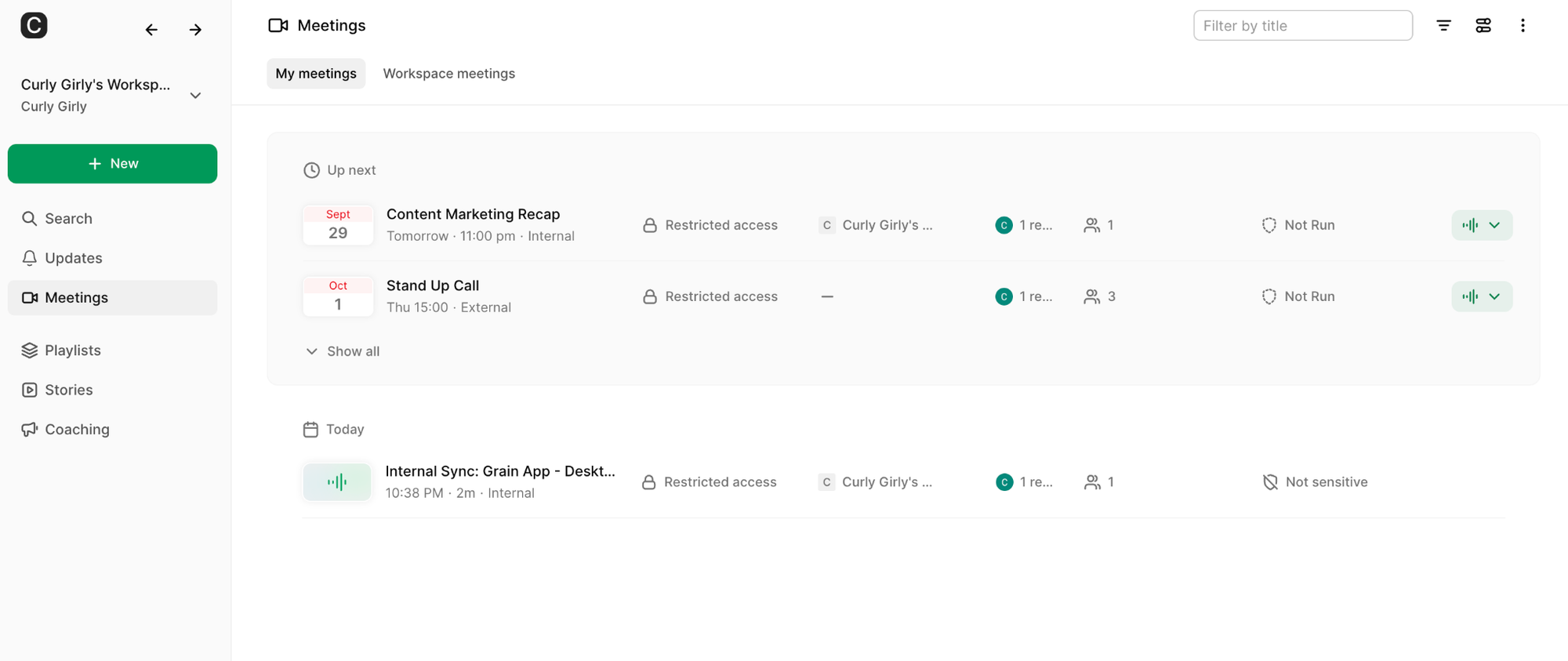
For e.g; you can clip a section where action items were mentioned and just send that, or clip out a customer’s exact words to use as a testimonial. It also has a “Stories” feature where you can combine clips from multiple meetings into one cohesive video.
Key Features -
- AI chatbox with context across all your meetings so you can ask it anything.
- A private notes section for your own thoughts, separate from the shared transcript.
- Full audio/video playback.
- Has “Trackers” feature to add and mark specific words, phrases, or concepts across meetings to get alerted whenever they come up
- Highlight text in a transcript, add comments, tag a teammate, or turn that highlight into shareable clip
- Detects sales meetings and automatically adds scores or you can manually score them under Coaching, based on set metrics with occasional AI feedback.
Pros –
- Free forever plan, includes 45-minute bot and bot-free recording, unlimited meeting views, free viewer seats, AI meeting notes, MCP access, and more
- Comes with Playlists feature to organize meetings
- SOC2 Type II certified, SSL encrypted, SSO supported
- Gives control over auto-capture settings, team auto-share, and more
Cons -
- Free plan caps you at 20 bot-recorded meetings if you’re signed up with a personal email rather than a company domain.
- Only available as a desktop app
- A handful of integrations currently
Pricing: Free $0, unlimited meetings, 45-min limit → Started $15/seat/mo (billed annually) → Business $29/seat/mo (billed annually), and custom Enterprise pricing
7. Otter – Best for taking lecture notes
Otter.ai is one of the oldest AI note-takers out there, used by people long before most of the others on this list even existed. It records, transcribes, and summarizes conversations in real time, and, like most tools here, it works across desktop, iOS, Android, and a Chrome extension.

What makes it different, though, is that Otter gives you a genuine bot-free option. The Chrome extension can capture Zoom and Google Meet calls without anyone joining as a visible participant, and the desktop app itself can record from your Mac or Windows machine, no bot at all.
Otter has earned its spot for lecture use, with its “auto-capture meeting screens,” as it takes screenshots of the shared slides and adds them right into your notes. Plus, teachers can record a lecture once and Otter can turn it into a lesson recap, a study guide, or a reusable course material. You can search the transcript for a keyword and jump directly to the exact moment it was mentioned, instead of going through the whole recording.
Key Features -
- Highlight any word or phrase, add a comment or image to the transcript, and share it with anyone.
- Link recorded audio with the transcribed text so you can click any word to hear that specific part in the audio
- Transcribes uploaded audio/video files (MP4, MP3, MPEG, etc), live meetings, or instant recordings.
- Supports 7 languages and multiple pre-built summary templates
- Asks its AI chat to summarize a meeting, pull out key information on a specific topic, or a list follow-up action items
Pros -
- Syncs smoothly with calendars and tools like HubSpot, Zapier, Notion, Salesforce, and more
- Genuine bot-free option, through both the Chrome extension and desktop app
- Great fit for in-person lectures and phone calls
- Easy to setup and use
Cons -
- Otter's OtterPilot, an AI bot auto-joins every meeting on your calendar if you sync with it, without asking first.
- LImited language support compared to most other tools
- Live transcription can lag, and accuracy occasionally slips or drops words
- Free plan is tight, 300 minutes a month, capped at 30 minutes per conversation, and only 3 file imports for the life of the account.
Pricing: Basic Free (300 min transcription/mo, AI hat within and across meetings) → Pro $8.49/user/mo → Business $24/user/mo → Custom Enterprise plan
What Should You Be Evaluating When Choosing One?
We’re a bunch of skeptical users, and with 50+ AI notetaker apps out there and just as many comparison articles (some clearly promoting their own), it gets overwhelming trying to figure out which is actually good enough for you.
Let’s be real, no single tool can check every box. But if it fits your purpose closest, that’s the right tool for you or your team. Here are some of the checklists you should go through when evaluating which one is best for you. I also used this checklist to evaluate tools
Be clear on your “why”
Before comparing tools, know why you need an AI notetaker in the first place. That alone filters out most of the options. If you’re a salesperson taking multiple calls a day and need something that just records and sends key data to relevant tools you work on, that’s one path.
If you’re a freelancer who wants it to record, transcribe, and retrieve action items across different clients and calls, that’s another reason. Once you know this, half your evaluation is done.
Does it have platform compatibility
You don't want to add more tools to an already heavy stack, and you're definitely not switching your video conferencing app just to make a note taker work. Check that it fits into what you already use, most tools cover Zoom, Teams, and Google Meet, but make sure it integrates smoothly without extra effort. If you also do in-person meetings or lectures, check whether it works on phone calls too, and whether it has desktop or Chrome extension support.
Can it provide transcription accuracy
Everything else, the summary, and the action items depend on this: a flawed transcript means a flawed summary and action items that cause real problems. Most tools I evaluated hit 90% accuracy, but only under good conditions: one-on-one calls, clear audio, minimal noise, standard accents.
However, according to a few tools G2 reviews it is backed up repeatedly that in case of cross-talk, background noise, or technical jargon, accuracy can drop to 70% to 80% or lower. Before committing, run a real test call and check how well it handles cross-talk, jargon, and multiple speakers, especially since that decides how accurate your summaries and action items end up being.
AI output quality
Look for structured summaries you can actually edit, so wrong details don't get sent to your team. Check that action items are assigned to the right person, not just flagged generically, and that speaker names are correctly attributed.
Having custom templates is a bonus too, so AI can always match the output with your meeting type, whether that's a one-on-one, a sales call, or a sprint review.
Look for privacy and admin controls
When deciding which tool to go with, it is necessary to evaluate and know where your recordings and transcripts are actually stored, whether it's locally or on a third-party cloud. Check if your data trains their AI models by default or if you get the option to opt out. Also see how easy it is to delete your data and who has access to transcripts, both as an individual and as a team user.
Language support and integration
Check whether the tool can push meeting data or key insights into the tools you already use, calendar, CRM, project management, Slack, on command. And if you work with clients in other languages, make sure it can transcribe and summarize accurately without losing details in translation.
Security and compliance controls
If you’re evaluating notetaker apps for an enterprise or a regulated industry like a legal or finance, proper certification isn’t optional. Key things to check for:
- SOC 2 Type II certification that confirms vendor’s security checks audited and verified over time.
- GDPR & HIPPA compliance with a signed BAA. GDPR protects the personal data of EU residents. And HIPPA with BAA protects health data, specifically U.S. focused.
- Configurable retention policies, including zero-day deletion for recordings and transcriptions.
 Charu Mitra Dubey
That's all folks
Even though this article is about the “best AI note-taker apps for meetings and calls,” there's no universally best tool out there. It's unlikely any single tool nails pricing, security, integrations, and features all at once. Honestly, there's no clean answer here. The real question isn't "what's the best?" it's "what's best for me and my use case?"
If you want something bot-free with the flexibility to jot your own notes and let AI build on them, Granola's probably your fit. Or if you're already using Wispr Flow for voice dictation and don't want to add another tool just for meetings, go with its note-taker feature instead.
Once you are clear on your why and what you actually need, you're in a win-win either way.
FAQs
- What is the best note-taking app for in-person meetings?
An AI note-taking app that comes with a bot-free mode allows you to transcribe and summarize in-person meetings. Granola is a good bot-free app that also comes with a mobile app, which you can use to record your in-person meetings.
- Can ChatGPT take meeting notes?
Yes, ChatGPT can take meeting notes if you share the audio recording or the meeting transcript. Many AI note-taking apps provide MCP connectors with ChatGPT and other AI tools, allowing you to sync both apps and send meeting transcripts directly to ChatGPT.
- What is a good free note-taking app for meetings?
Fathom Note Taker offers a good free version with several important meeting note-taking features. It can record and transcribe your meetings, generate AI-powered summaries, and help you quickly find key points and action items from your conversations. It also works with popular video conferencing platforms, making it a useful option if you want to try an AI meeting note taker without paying for a subscription.
- How can I use AI to take notes for me in a meeting?
Video conferencing apps like Google Meet, Microsoft Teams, and Zoom now come with their own AI note-taking capabilities, such as Gemini in Google Meet Gemini and Copilot in Teams, which can take meeting notes for you. However, you can also use third-party apps that integrate with major video platforms and offer Features such as meeting transcription, speaker identification, AI summaries, and integrations with other CRM tools.
Also Read: 10 Best Product Hunt Alternatives in 2026 (Honest Reviews)